What Is an Industrial PC?
An Industrial Pc is a computer designed to operate near machines, production lines, and other demanding work environments. It may monitor sensors, display operator instructions, collect production data, or run control and inspection software. Unlike a typical office desktop, it is often built with a rugged case, industrial connectors, and support for continuous operation. Yet the label is not perfectly standardized. Some products resemble compact PCs; others are panel-mounted touch computers or fanless box systems.
The need for dependable computing is easier to see as factory automation expands. The International Federation of Robotics reported 4,281,585 industrial robots operating in factories worldwide in 2023, a 10% increase from the previous year (World Robotics 2024). That figure describes robots, not Industrial PCs. Still, it shows the scale of automated production environments where computers may coordinate data, interfaces, and equipment.
A practical definition depends on the job. A unit beside a dusty packaging line may need sealed ports and a readable touchscreen. A computer in a control cabinet may instead prioritize compact dimensions, serial connections, and stable performance across temperature changes. Not every factory needs the same hardware. And “industrial” alone is not a guarantee. Buyers should check the operating-temperature range, vibration tolerance, ingress rating, processor support, and replacement-part availability against the actual site conditions. The details matter. A robust-looking case cannot compensate for an unsuitable configuration or poor maintenance planning.
Definition and Core Purpose of an Industrial PC
An industrial PC (IPC) is a computer built to operate near machines, production lines, and other demanding work areas. Unlike a typical office computer, it is designed to tolerate conditions such as vibration, dust, and wider temperature changes. Its core purpose is practical: collect data from equipment, run control or monitoring software, and present useful information to operators. A panel-mounted unit might display machine status beside a conveyor; a fanless edge computer could process sensor readings inside a cabinet. The exact role varies. An IPC can support a control system, but it does not automatically replace a dedicated controller.
The 2025 Smart Manufacturing Survey, covering 600 manufacturing leaders across 17 countries, found that 92% expected smart manufacturing to be a primary driver of competitiveness within three years. That context helps explain the IPC’s role: it provides computing close to industrial processes, where data can be gathered and acted on with less dependence on remote systems. That matters. Still, the survey reports expectations, not proof that installing an IPC improves output. Real performance depends on software, network design, maintenance, and the conditions on the factory floor. A dusty enclosure or poorly planned data connection can undermine an otherwise capable computer. Industrial hardware is not magic.
Key Components and Rugged Design Features
An industrial PC is more than a desktop computer in a metal box. It combines a processor, memory, storage, network interfaces, and input-output ports to control equipment or collect data. Solid-state drives are common because they handle vibration better than spinning disks. Serial and Ethernet ports can connect sensors, displays, and controllers. Exact port choices depend on the machine—and sometimes its age. Older equipment may still need legacy connections.
Rugged design starts with the enclosure. Metal cases help protect internal parts from impact, while sealed connectors and filtered vents can limit dust and moisture. Fanless models reduce moving parts, but still need a clear path to shed heat. Wide-temperature components, shock-resistant mounts, and secure cable connections also matter on a factory floor. Dust matters. Rugged is not invulnerable. A stated temperature range or protection rating applies only under specified conditions, so installation and maintenance affect real-world reliability.
Tips: Check the operating temperature, vibration level, and available space before choosing a PC. Leave room around heat-dissipating surfaces, and verify every required port. A small oversight, like a tight cable bend, can cause trouble later.
Common Types of Industrial PCs
What Is an Industrial PC?
Common Types of Industrial PCs
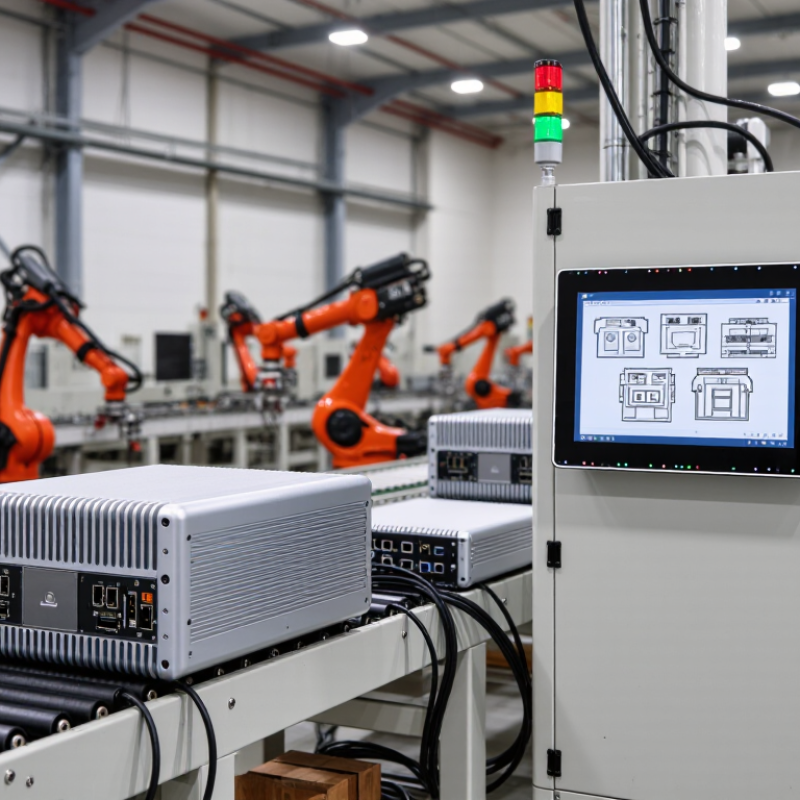
Industrial PCs are built for environments where ordinary office computers may struggle. Their form depends on where computing happens and how operators interact with equipment. Panel PCs combine a display and computer in one sealed unit. They suit machine controls, production dashboards, and washdown areas when properly rated. Box PCs separate the computer from the screen. Technicians can mount them inside cabinets and connect them to sensors, cameras, or factory networks. Small details matter: connector placement can determine whether maintenance is easy or awkward.
Rackmount PCs fit control rooms and equipment racks, where expansion slots and service access are useful. Embedded PCs are compact and often fanless, making them practical for machines with limited space or dust exposure. Some systems use extended-temperature components, but “industrial” alone does not guarantee resistance to vibration, moisture, or heat. Check the operating specifications. Gartner forecast worldwide edge-computing spending would reach $232 billion in 2024, up 15.4% from 2023. This figure covers edge hardware, software, and services—not industrial PCs alone—yet it signals growing investment in computing near equipment. The categories can overlap. That can make selection less tidy than a product label suggests.
How Industrial PCs Operate in Industrial Environments
Industrial PCs operate close to the machines they monitor, rather than in a quiet office. They collect data from sensors, programmable controllers, cameras, and production equipment through industrial communication ports. A unit might read a temperature probe, display a live process diagram, and send an alarm when a motor overheats. This local position can reduce delays and keep essential functions available when a remote connection is interrupted. Some models use sealed enclosures, wide-temperature components, and solid-state storage to tolerate dust, vibration, or frequent movement. These features vary. Operators should match the computer’s rated temperature, ingress protection, and shock limits to the actual site, rather than assume every system handles every condition.
In a factory, an industrial PC may run continuously beside a conveyor, inside a control cabinet, or at an operator station. Its software can log production values, present instructions, and let staff adjust settings within approved limits. Multiple network interfaces and serial connections help it communicate with older and newer equipment. During maintenance, technicians may check cooling paths, cable strain, storage health, and event logs. Fanless designs reduce moving parts, but heat still needs somewhere to go. Nothing is foolproof. A specification can look right on paper and still miss heat buildup inside a crowded cabinet.
Major Applications Across Industries
An industrial PC is a computer built to operate near machines, dust, vibration, and temperature swings. In manufacturing, it reads sensors, displays machine status, and coordinates production equipment. On a packaging line, for example, it can track conveyor speed and flag a jam before cartons pile up. The International Federation of Robotics reported 4.28 million industrial robots operating worldwide in 2023. Those robots need reliable control and data systems around them, though an industrial PC does not replace every dedicated controller.
Energy and utilities are another major application. Computers at substations, treatment plants, and solar sites can collect equipment readings and support remote monitoring. The International Energy Agency’s Tracking Industry 2023 report says industry accounts for about 37% of global final energy use. That makes energy monitoring valuable, but better data alone does not guarantee lower consumption. Operators still need to investigate what the readings mean.
Warehouses use industrial PCs to coordinate scanners, sorting equipment, and inventory systems. Food-processing facilities use them to monitor temperatures and production steps; healthcare facilities may use rugged terminals for equipment monitoring and records. Conditions differ widely. A computer suitable for a clean control room may fail near washdown equipment. And a live dashboard can mislead when sensors drift. Choosing the right system means checking the actual environment, required connections, and maintenance plan—not just the processor speed.